


Article summary
I recently took an in depth swing at something that, until recently, felt completely out of reach: build a functional prototype of a web app…with zero development background.
Why? A couple reasons. I was curious and looking to get more experience with AI powered development. Second, I needed a better tool. I co-lead a local chapter of a youth development and mountain biking program (Adventure Team), and the third-party platform we currently use for managing teams and communication is, how do I put this delicately, hot garbage. After several seasons of wrestling with it, I’ve developed a pretty deep understanding of what our coaches, parents, and riders actually need. And like any rational person who has suffered long enough, I thought, Maybe I should just build something better.
Also: AI exists now. Which makes this theoretically possible for someone like me, whose experience is limited to no development training
A coworker recommended chatPRD and Vercel v0, and I figured I’d give them a shot. What followed was equal parts magical, chaotic, enlightening, and humbling—in a good way.
Here is what I learned and what it reminded me about collaboration on software teams, whether the person you’re collaborating with is a developer, or an enthusiastic AI agent.
The Idea: A Team Management Platform
Because I’ve run our local Adventure Team for a couple years, I know our users and use cases intimately:
- Volunteer coaches – need to be able to quickly take attendance at the beginning of each night, confirm riders have any required items (epipen, inhaler, etc) and upload photos to their group.
- Parents of participants – need to be able to see what group their kid is in and view photos uploaded by coaches from that group.
- Team leads – need to be able to see all groups and information for all riders and coaches and send area wide announcements.
This was a perfect setup for using AI tools—I didn’t have any technical expertise, but I did have a crystal-clear understanding of the product’s purpose and the jobs it needed to do.
Writing the PRD with chatPRD
I started with chatPRD, and honestly, it was delightful.
Instead of battling a rigid PRD template, I was able to stay fully in “user empathy mode.” The tool let me talk through each user type, their needs, and the platform’s required functionality as if I were having a casual conversation with a colleague.
If traditional PRDs are spreadsheets wearing business suits, chatPRD is a friendly bartender wiping a glass asking, “So what is it your users really want?”
The process was:
- Creative
- Flexible
- Surprisingly thorough
- Void of formatting headaches
- Filled with clarifying questions that sharpened my thinking
Would I recommend it to Atomic clients?
It depends. If you deeply understand your product and your users, chatPRD is fantastic. But if the product is highly technical or the requirements are fuzzy, the tool may gloss over important details that a more structured process would tease out.
For my use case? It was perfect.
Attempt #1 with Vercel v0: The Glorious Meltdown
With my shiny new PRD in hand, I moved over to Vercel v0, handed it some context, and dropped in the document.
v0 took one look at that PRD and said, “Oh, sure, I’ll just build the entire front end and back end all at once. No problem.”
Narrator: It was a problem.
At first, it felt magical. v0 scaffolded a full application, wired up pages, connected pretend data, and looked extremely confident doing it. Code was magically appearing and scrolling. I felt so smart.
And then… everything fell apart.
Any time I tested one part of the flow, something else broke. I assumed the “AI that fixes code errors” magic would save me, but instead, v0 enthusiastically refactored things into new and exciting states of brokenness.

This is the moment I realized something important:
I had unintentionally expected the AI to read my mind. I assumed the PRD captured every nuance of what I wanted, and that v0 would interpret my omissions generously.
It did not.
Attempt #1 quickly became a tangle of failing tests, contradictory logic, and increasingly unhinged optimism on my part. I scrapped it entirely.
Attempt #2: Slow Down, Scope Down, Collaborate
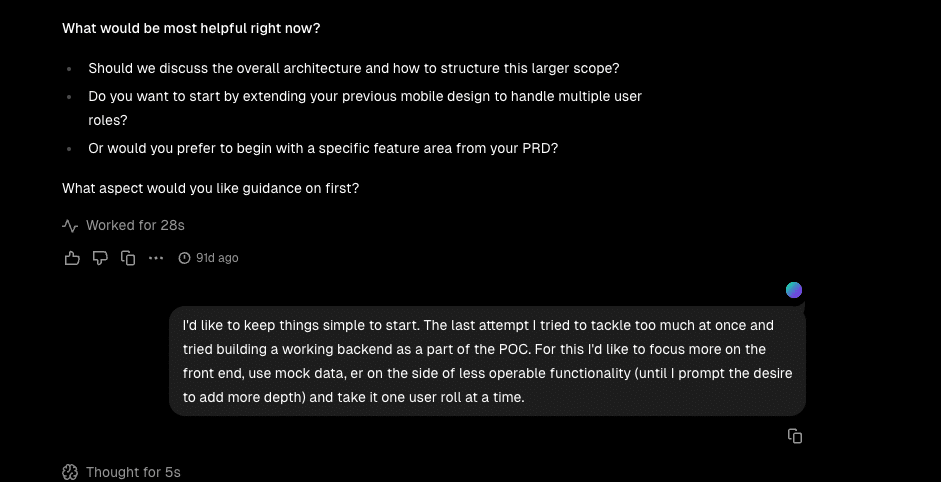
For round two, I gave v0 two crucial instructions:
- “Build only the front end.”
- “Check in with me before doing anything.”
This changed everything.
By focusing on front-end workflows—and using test data instead of a real backend—I could iterate much faster. The AI no longer spiraled into full-stack chaos. It slowed down, asked thoughtful questions, and worked with me step by step.
This version of collaboration with v0 felt surprisingly human:
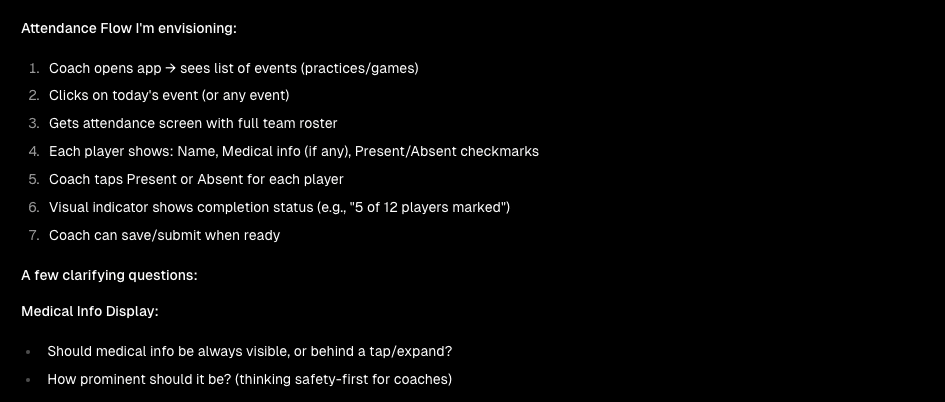
- It asked clarifying questions.
- It suggested ideas I hadn’t considered.
- It flagged UX ambiguities I didn’t know were ambiguous.
- It adapted quickly to feedback.
It also generated a UI that was clean, modern, and remarkably usable.
And because it wasn’t fighting backend constraints, the workflows were stable enough to test with actual users.
Then it struck me, this collaborative, iterative pace mirrors what we do at Atomic. When developers and clients work closely in small increments, the product improves not just technically, but creatively. Why wouldn’t the same thing be true when working with AI?
The Prototype: Surprisingly High Fidelity
The final prototype included:
- A fully functional front end
- Three complete user workflows
- Clear, intuitive UX
- Test data powering the flows
Along the way, v0 surfaced important product questions, like:
- “Does the user really need to do this?”
- “Is this feature useful or just clutter?”
These questions forced me to pause and think through the design more rigorously.
In the end, the prototype didn’t just validate ideas—it revealed ones I didn’t know I needed to think about.
Lessons Learned
1. AI can’t read your mind — neither can humans.
I assumed the PRD contained everything in my head.
It didn’t.
Attempt #1 paid the price.
This mirrors larger projects with clients: even confident visions can hide unspoken assumptions.
2. Software development is creative work.
Yes, it’s technical. Yes, it involves architecture, data, performance, and edge cases.
But it’s also deeply creative.
When you bypass the human (or AI) creative iteration, you miss opportunities for better ideas and clearer thinking.
3. Tight feedback loops prevent disaster.
Attempt #1 = big-bang delivery → chaos.
Attempt #2 = iterative flow → clarity.
Whether working with AI or humans, the recipe is the same: Small steps, constant communication.
4. Clients rarely have a fully formed vision — and that’s okay.
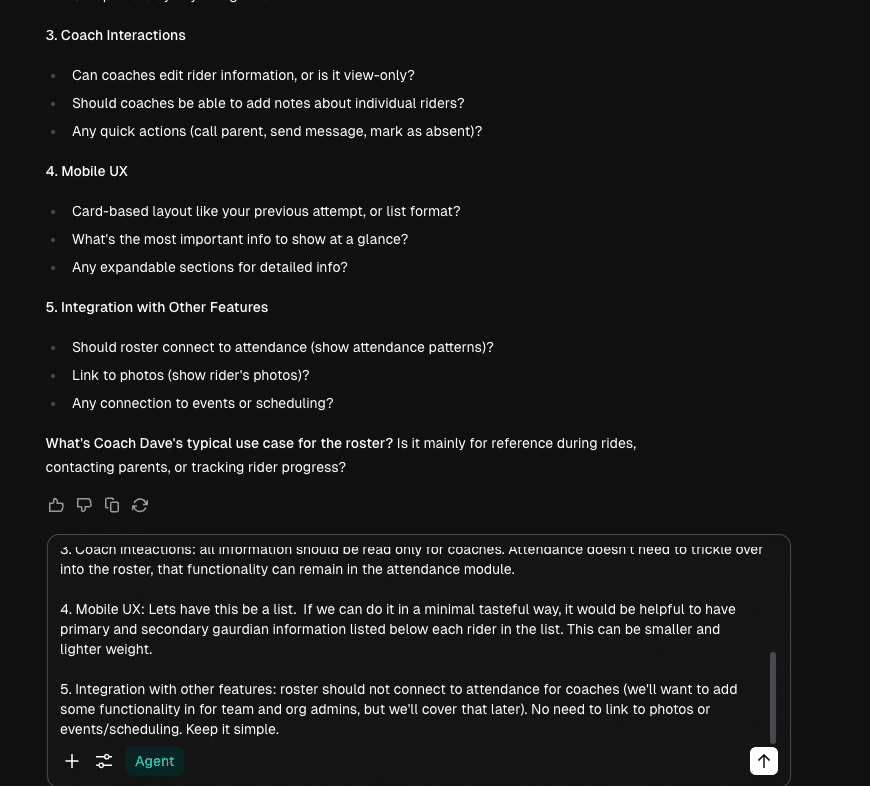
Even when an idea feels complete in your head, the real details are only able to emerge through conversation, collaboration, and iteration. I got the best results when I slowed down and provided a lot of context and information in response to questions. The more information that got out of my head, the better the result.
Recommendations: How Not to Crash and Burn if You Try This Yourself
- Scope like your life depends on it.
Start with the smallest slice. - Tell the AI to slow down.
Explicit instructions matter. - Use test data early.
Skip the backend until you actually need one. - Expect to uncover blind spots.
AI will ask questions that reveal what you forgot to think about. - Treat AI like a junior dev with superpowers.
Fast, helpful, unpredictable, needs guidance. - Don’t skip the human part.
Collaboration—whether with a person or an AI—is what makes software good.
Conclusion
Building this prototype didn’t just give me a working app, it made me a better delivery lead. Slowing down, communicating clearly, and staying tightly engaged weren’t just “nice to haves.” They were the entire reason Attempt #2 succeeded.
Whether you’re working with AI or actual developers, the truth is the same:
Good software comes from collaboration, creativity, and constant conversation—not from throwing requirements over a wall and hoping someone (or something) reads your mind.