


I’ll be the first to admit that I’m not usually at the cutting edge of AI usage for software development. But one area where I’ve become an immediate convert is using AI for PR reviews. My team is experimenting with a couple of different AI approaches right now, and both are bringing immediate value in different ways.
Enforcing project best practices with Codex and Cursor rules
Many developers on my project use Cursor for day-to-day work. We’ve been gradually building a set of Cursor rules that describe our project best practices. These rules include guidelines for things like dependency management, optimizing database queries, and building on top of existing features.
Homegrown automation
One of the client developers wrote a great Python script that pulls in the appropriate Cursor rules based on the files changed in a PR. It uses the alwaysApply and globs properties in the Cursor rule to do this. The script then concatenates those rules into a prompt. The prompt instructs the LLM to act as a senior engineer performing a code review on the PR, and to create a list of findings with suggested fixes.
We have a GitHub Actions workflow that generates the prompt and passes it to Codex using codex exec. The resulting code review is output as a Markdown file. Another Python script processes that file and uses the GitHub CLI to post the comments on the PR.
Tailored feedback
Here’s an example of a review comment on a PR I opened, where the AI pointed me toward an existing function that had more robust handling for a token refresh error.
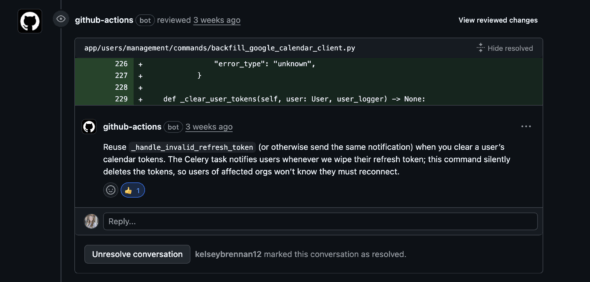
I really like this approach because it feels the closest to having another developer on the team review my PRs. The feedback is tailored to the way we like to do things on this project. It also lets us automate checks for issues that have caused problems in the past.
One frequent example was loading large datasets into memory in a Django management command. We added a Cursor rule that describes the best practice (using pagination), and now any PR that doesn’t use follow it gets flagged automatically.
It’s also incredibly easy to introduce new considerations into the review process—just add a Cursor rule. These rules also guide the coding agent during local development, so we get a double benefit.
This approach saves human reviewers time and lets them focus on the feature instead of code style concerns. The reviews aren’t always perfect, but over the last few months I’ve found that 60–70% of the AI’s comments are solid findings that I choose to address.
Identifying subtle bugs with Sentry
We use Sentry for application monitoring and recently turned on its beta AI Code Review product for our backend repository. These reviews focus more on identifying potential bugs than on enforcing best practices.
Overall, the quality has been mixed, but a handful of the reviews over the past few weeks have been genuinely insightful. They’ve also prevented subtle but impactful bugs from making it into production.
Here’s a recent example. Differences in naming conventions between our internal data models and external APIs created confusion when I wrote the code. This would have caused bugs once deployed. A very careful human reviewer might have caught the issue, but it likely would have slipped through.
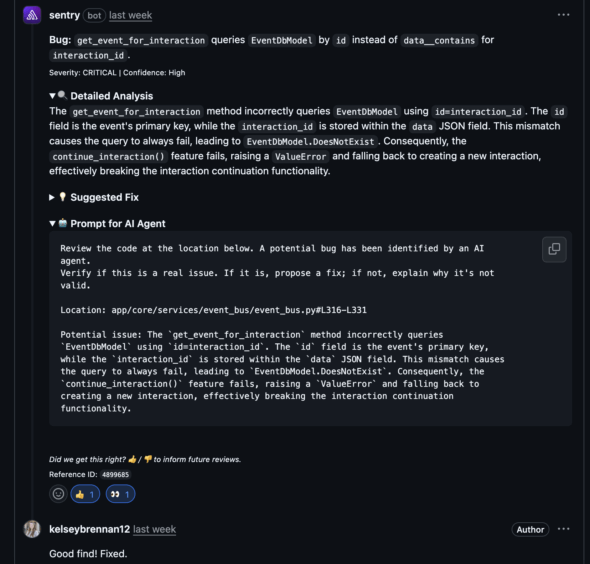
I also appreciate that Sentry’s comments include a prompt you can hand directly to your coding agent to evaluate the finding and fix the bug if needed.
While a few comments have been very helpful, most Sentry PR reviews simply leave a “🎉” reaction emoji on the PR description, which means it didn’t find any errors. On the plus side, it also doesn’t seem to produce many false positives.
Take all AI code reviews with a grain of salt
Neither of these AI review tools is perfect. You still need project context to evaluate whether a finding is valid. I wouldn’t recommend relying on them exclusively, but they provide useful feedback more often than not and help improve our application’s stability.
On a fast-moving project where everyone has a million things on their to-do list, it feels great to have a quick feedback loop with the AI. Bugs or code style issues can get identified and resolved before I ask one of my teammates to spend their limited time reviewing my code.