

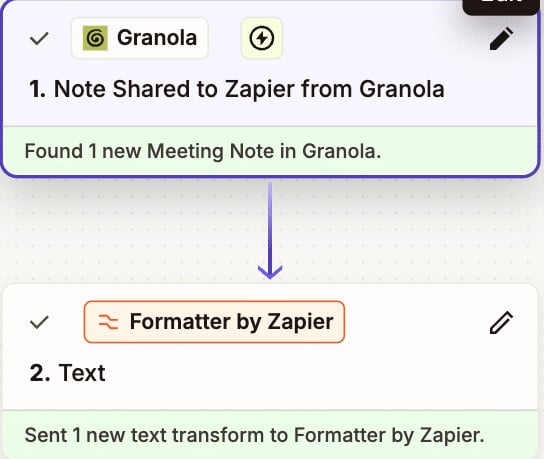
I have been trying tiny experiments using AI tools to automate the essential, yet mundane tasks that I handle as a delivery lead. The “tiny experiment” approach was inspired by Anne-Laure Le Cunff’s book, Tiny Experiments: How to Live Freely in a Goal-Obsessed World. The idea is to explore what is possible and not worry about creating the perfect workflow. This approach is especially relevant for the constantly changing world of AI tools. Here’s what I did with some of those AI tools, including Zapier.
Tiny Experiment 1 – Generating meeting notes with AI
My first experiment was to use both ChatGPT and Granola to capture meeting notes. After a fellow colleague and I did some side by side comparisons, Granola was the preferred tool. That’s because it:
- Is easy to use out of the box
- Offers templates that will format summaries based on the type of meeting and custom recipes where you can drive how summaries are created
- Offers a chat box in the meeting to prompt and refine the generated notes
- Gives you the ability to take your own notes and merge them with the AI-generated notes
- Allows you to separate meetings into folders. You can have the AI search across meetings in a folder to answer questions like, “What decisions did we make on requirement A over time, and what is the latest set of use cases for it?”
- Integrates with Google Calendar so that Granola meeting notifications appear, and one click launches the meeting and note-taking
Tiny Experiment 2 – Getting action items into a task management tool
The next experiment was to automate moving action items from the meeting notes into a tool so that my entire team can see assignments, status, and priorities. I used ChatGPT to do some quick research on potential methods. In my prompt, I gave Notion as a preferred option for the task management tool since my organization has a number of people already using it. ChatGPT suggested using Zapier as the mechanism for integration since Granola has built-in hooks to Zapier, and Zapier integrates to Notion as well.
Step 1 – Granola Recipe
I created a custom recipe in Granola to generate action items in a format that could be understood by Zapier and would map to the task management database in Notion.
This is the prompt I used for the recipe:
You are the project manager for a custom software development team. You have frequent meetings that include internal and external team members. You need to capture action items for each meeting in a format that can be interfaced into Notion using Zapier. Create a list of action items from the meeting using the following format:
Action items:
– [[email protected]] Task description here (Due: 2025-01-15)
– [[email protected]] Another task here
– [[email protected]] Talk to vendor about contract (Due: 2025-12-20)
Meeting:
{{meeting_title}} — Granola Action Items for {{meeting_date}}
In the first phase of my experiment, I was using the free version of Granola. I had to manually copy the action items and send them via a Zapier email address to initiate the integration. In the second phase, I upgraded to the business version of Granola. This eliminated the email step by using the native Granola-to-Zapier integration.
Step 2 – Zapier to Notion integration
Zapier was new to me, so I leveraged their AI assistant to build the integration workflow. After 2 hours of working with the tool I had the end-to-end integration working. That was faster than learning the syntax on my own and then debugging. Here is the high-level workflow in the Zap:
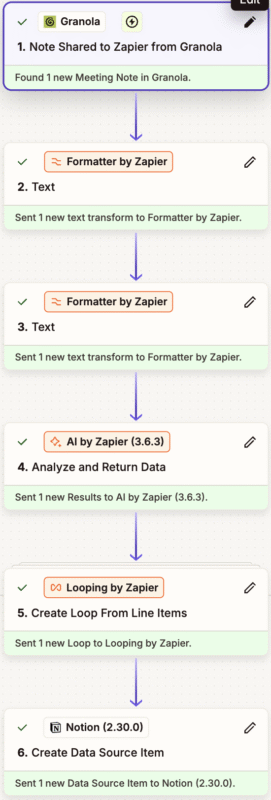
- The formatter steps separate the action item data from the rest of the text in the meeting note.
- The AI by Zapier step extracts the data I needed for Notion. I provided the prompt to describe how to select the input and match it to the proper Notion field. The AI handles this quite reliably.
- The loop creates the individual tasks in Notion. The loop process took the longest to get working. Zapier allows you to test each step in the process individually so that you know the output matches what you need. I had to steer the AI tool through multiple iterations of the loop function and point out what did not work each time.
Step 3 – Notion
I used the standard Task Tracker database in Notion with just a few modifications. Updates in Notion were easy to make so starting with the Task Tracker template was a time saver.
So the final workflow is:
- Record the meeting with Granola and use a custom recipe to generate actions items
- Use the Granola 1 click ‘Send to Zapier’ integration to send the meeting notes to Notion
- Share the Notion database with my project team so that everyone can use a single tool to keep the status of action items up to date
Having action items in one spot helps me to be more organized and implementing this automation minimizes the time I spend making that happen.