


I love working as a generalist.
Every project and every day’s agenda is unique. One morning I might be facilitating a client workshop to prioritize business objectives, while the next day it could be reviewing stories with software developers, conducting user interviews, creating detailed high-fidelity designs, or a slew of other potential tasks. For me, this variety keeps me engaged and excited, and is a huge reason why I joined Atomic Object.
That said, many of these varying tasks require different skills and tools, which are constantly changing and evolving. Practices, tools, and technologies—everything changes, seemingly every 15 minutes. For example: as you’re probably aware, AI has revolutionized the tech industry. As a reminder, ChatGPT was launched only three years ago.
You can probably see where I’m going with this: it’s difficult enough to stay up-to-date with one piece of software technology when you’re constantly using it in your day-to-day job tasks. As a generalist it can get much more tricky:
“Okay, I last opened this software three months ago…and it looks like the entire screen is updated and now completely different. Cool.”
I don’t really think there’s a magic bullet way to stay relevant. However, I’ve found one method that works for me that’s worth sharing: find ways to ridiculously and intentionally mess around with job-related tools within your hobbies.
Example 1: Fantasy Football and User Research Tools
For over a decade now I’ve enjoyed playing fantasy football in a league with my friends, both as a way of staying connected, and (ideally) as a way to lovingly talk smack when my team outperforms. Part of this for me has included writing weekly updates highlighting top teams and performers and doling out fake, weekly awards.
Years back, instead of just sending out an email, I started posting these updates on a website. This both helped archive updates and helped me catch up on website builder tools like Webflow and Notion to improve my responsive website design and development skills.
Another task: every summer we would discuss thoughts on any league changes. Instead of a text thread, over the years I began using user research survey tools (Optimal Workshop, UserZoom, and UserTesting.com) to send and analyze the data.
Was it a bit of overkill? Slightly. But it was also fun discovering new survey tools and features through the lens of asking friends to vote on how many chicken nuggets the last place finisher should have to eat in one sitting. (Answer: we settled on 40. Spoiler: It’s way more difficult than you’d expect. I do not recommend.)
Example 2: “Survivor” Reality TV Show and Figma Updates
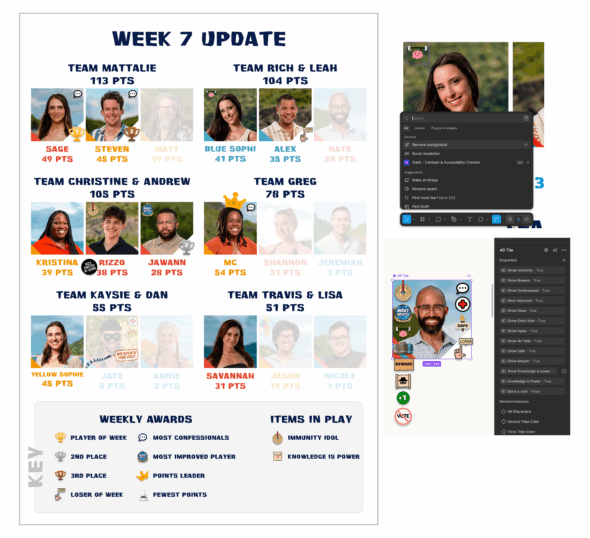
I also run a Survivor “bracket” with a bunch of friends. We all pick favorite contestants and get various points based on what happens in the CBS competition/reality TV show.
While it began as just sharing screenshots of a simple spreadsheet, over the past several years I’ve enhanced it with full visual leaderboard updates constructed in Figma. Why? The idea started as a way to teach myself Figma’s (then new) autolayout feature. Whether it was variants, dark mode, variables, etc., if I wasn’t immediately using the feature at work, I’d make sure to find a way to mess around with it on the leaderboard visual. I’d catch up on Figma’s new UI features while creating the weekly leaderboard.
Recently, it’s been a handy way to test out Figma’s new AI tools, specifically as a way to artificially remove backgrounds, boost resolutions, and quickly edit the layout within the AI prompting.
Why This Works
So why does this work for me? I think it hits a few important aspects of both learning, and maintaining job skillsets:
Lower stakes creates a better environment for discovery: It’s easier to try something new when it’s a fun or ridiculous subject. There’s no pressure to get it right or demand a perfect output. For example: testing out Figma’s new AI-based “Erase object in image” feature by cropping the random cousin-who-has-an-awkward-smile out of the family photo.
Consistently messing around prevents skill decay: Most forgetting happens soon after you stop using a skill. By having small, regular sessions where you apply these skills, it prevents a steeper drop-off.
Context is key: Regularly checking in with software preserves the context, whether that’s terminology, locations, workflows, etc.
You are more aware of changes when they do occur: As these tools often change incrementally, it’s easier to notice all the small changes when you’re using them regularly.
The Bottom Line
To be fair, we’re talking about hobbies and passion projects here, so it’s less about “maximizing” productivity and more about finding the right fit. It’s more about thinking “Oh, actually that’d be a fun addition to my hobby.” The output doesn’t matter. Just get in there and mess around.
As for me, the next step is seeing what more AI automation can do, specifically how much it might be able to help with the Survivor bracket. Can I write a prompt that will help score the show instead of me having to watch with my spreadsheet open? Can it automatically update the scoreboard design? How can cursor or Figma Make help me rework the entire visual? I just need to start messing around.