


Like many of my colleagues, I’ve been experimenting with tooling around sandboxed agents. Lately for me this looks like a handful of Claude Code agents, each in an isolated Docker sbx. Today I’m going to share what it took to give them access to a test database.
SQL Server and Docker sbx
My current project, like many of ours, runs some of its tests against a real database. These days, a local instance of postgres or mysql or even ms-sql is typically a quick docker compose up away.
This should align nicely with sbx’s pitch: “docker compose up, inside the sandbox“.
This quickly fell apart, though, with our SQL Server database image.
In short, Microsoft doesn’t currently ship an ARM image, and sbx’s docker can’t emulate AMD64 as Docker Desktop’s can.
As a plan B, I tried the old deprecated azure-sql-edge ARM image, but it fails for other reasons.
So we can’t run the database inside sbx. Okay. Let’s run it outside.
Sharing one server
From the application’s point of view, not much needs to change. Tests point to a database server on localhost like Server=127.0.0.1,1434; Database=MyAppTest.
On my Mac, that’s the SQL Server from docker compose up. Inside a sandbox, localhost is the sandbox itself, and there’s nothing listening there. Yet.
The other half of the problem is that I have several sandboxes, and if they all share a database they’ll stomp all over each other’s data, when they happen to run tests at the same time.
Fortunately we’ve already solved a version of this. We add a suffix to the database name for isolation between multiple test projects, and also between multiple CI runners sharing a database server. For CI, that suffix comes from the runner’s AGENT_NAME environment variable.
So a sandbox just needs its own AGENT_NAME, which I set when I create it:
- sb-feature-a connects to localhost:1434/MyAppTest_sb-feature-a
- sb-feature-b connects to localhost:1434/MyAppTest_sb-feature-b
I set it with sbx create -e AGENT_NAME=sb-feature-a, using a hyphen instead of the sandbox name’s period, since the value ends up inside a SQL identifier.
The connection strings have the same host and port, but different database names. All that’s left is making localhost:1434 inside each sandbox actually reach the server outside.
Forwarding the port
There’s another way to do this: inside the sandbox, the host is reachable at host.docker.internal, and I could inject config to point the tests there. Instead, I wanted to see what it would take to generically forward a port from localhost, so that the application can be none the wiser. It didn’t take much!
socat is a small, venerable tool for connecting one thing to another: sockets, files, pipes, and so on. Here, we want it to listen on a local port and pass every connection through to the same port on the host:
socat TCP-LISTEN:1434,bind=127.0.0.1,fork,reuseaddr \
      TCP:host.docker.internal:1434
The trickier part is when to run it. I started with sbx’s startup hook, but found that it didn’t reliably run on resume, so I wound up adding an idempotent script that I could wire in to a few other places like login:
port=1434

if pgrep -f "^socat TCP-LISTEN:$port," >/dev/null; then
  exit 0  # already forwarding
fi

nohup setsid socat "TCP-LISTEN:$port,bind=127.0.0.1,fork,reuseaddr" \
  "TCP:host.docker.internal:$port" >/tmp/test-db-forward.log 2>&1 &
(nohup setsid keeps socat running after the shell that started it goes away.)
sbx is moving very quickly, and I see that my “v2” yaml (which holds the ‘startup’ commands) is already out of date. Perhaps this will be unnecessary when I move to the newer v3.
Putting it all together
Here’s the whole picture, with a few agents working at once:
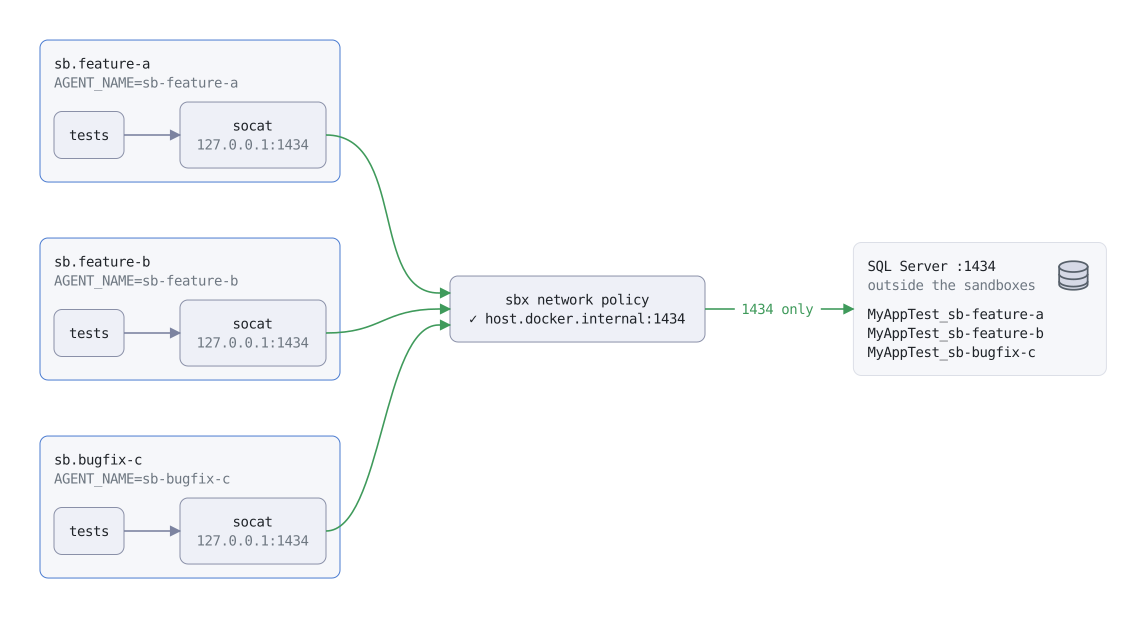
From left to right:
- The tests connect to 127.0.0.1:1434, just as they do on my Mac.
- socat picks up the connection and passes it along to host.docker.internal:1434.
- The sbx network policy lets it through. This is a separate sbx feature I won’t go deep on here, but outbound traffic can be limited to an allowlist. My agents can reach the database, but no other services listening on my Mac.
- SQL Server, on the host, receives the connection.
- The database name keeps each sandbox’s activity separate: each database access gets the AGENT_NAME suffix mentioned earlier.
Telling the agent
One more piece: the agents need to know the database lives outside. Otherwise, an agent whose tests can’t connect might reasonably try docker compose up itself, and we already know how that goes. So each sandbox gives its agent a few lines of guidance: there’s a SQL Server on the host available via 127.0.0.1:1434, here’s how to check it, and if it’s down, ask me rather than trying to start one.
My current automation copies a CLAUDE.md into the sandbox’s home directory, but this looks like another thing that v3 may do better, with built-in agent context.
Wrapping up
I came at this because SQL Server wouldn’t run inside a sandbox, but I might have landed here even if it did. One warm server shared by every agent is lighter than a SQL Server per sandbox, each wanting its own couple of gigabytes of RAM and its own cold start.
It also leaves us some room as things change. Running SQL Server on an Apple Silicon Mac depends on x86 emulation, and that’s in the hands of Apple, Microsoft and Docker. If our test databases end up on a remote host someday, the sandboxes will barely notice.
And the pattern isn’t specific to databases. Anything that can’t (or shouldn’t) come inside the sandbox can be reached the same way: a forwarded port, a narrow allowlist entry, and some form of namespace isolation if needed.
With all of this in place, I can leave a few agents YOLO’ing in the background, each on its own branch, running its own tests against its own databases, and not worry about them tripping over each other.