

During the COVID-19 pandemic, I like many found myself with a lot of free time. So like many others, I deciding to spend way too much time on my computer. This led to ultimately running into frustration with the lack of a unified theme system. with MacOS, which not longer ran well the ancient 2013 Macbook Pro I was using at the time. I saw how others online were able to have complete control over their desktop environment. So I decided to switch to Linux for my daily driver and try my hand at customizing my desktop environment.
Fast forward several years later, and I’ve gotten pretty decent at it. Here’show I built a single command that switches the theme across my entire Hyprland desktop: terminal, status bar, launcher, notifications, wallpaper, tmux, and every running Neovim instance.
The Problem: N Apps, N Formats, Zero Coordination
On macOS, you flip one toggle and the whole OS goes dark. On Windows, same story. On a tiling Wayland compositor like Hyprland, you’re on your own.
My daily desktop is Hyprland on Arch Linux. The tools I use every day (Alacritty, Waybar, Rofi, SwayNC, Tmux, Neovim) each have their own config format, their own color syntax, and their own reload mechanism. There is no unified theme API. No dbus signal. No XSettings daemon. Nothing that says “hey, the user wants Catppuccin now.”
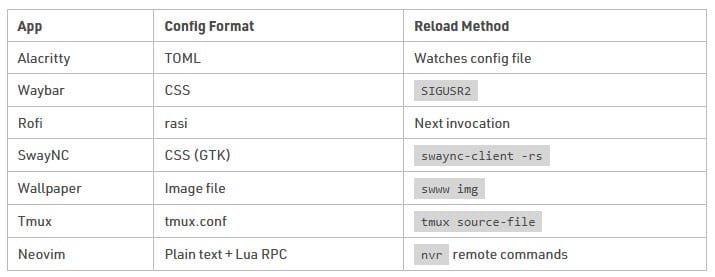
Here’s what “switching themes” actually means:
| App | Config Format | Reload Method |
|---|---|---|
| Alacritty | TOML | Watches config file |
| Waybar | CSS | SIGUSR2 |
| Rofi | rasi | Next invocation |
| SwayNC | CSS (GTK) | swaync-client -rs |
| Wallpaper | Image file | swww img |
| Tmux | tmux.conf | tmux source-file |
| Neovim | Plain text + Lua RPC | nvr remote commands |
Seven apps. Five config formats. Five different reload mechanisms. Tools like pywal generate color palettes from wallpapers, but I wantedcurated themes, hand-picked color files from upstream projects, applied consistently everywhere, with one command.
So I, with a little help from Claude, wrote a script that can apply a theme to my entire desktop.
The Architecture: Convention Over Configuration
The whole system rests on one idea: a theme is a directory with known filenames. That’s the entire contract. No manifest. No JSON registry. No config file that lists themes. Drop a folder in, it works.
themes/
  alacritty-base.toml        # shared structure (font, window, keybindings)
  .current-theme             # state: one line, theme name
  scripts/
    theme-switcher           # the CLI
    rofi-themeswitcher       # GUI picker
  themes/
    CatppuccinMocha/
      alacritty-colors.toml
      waybar.css
      rofi.rasi
      swaync.css
      tmux.conf
      nvim.txt
      wallpaper.png          # optional
    Dracula/
    Nord/
    ...                      # 14 themes total
Theme discovery is a directory scan:
for theme_dir in "$THEMES_DIR"/*/; do
    theme_name=$(basename "$theme_dir")
done
No registration step or adding your theme to themes.json. If the directory exists and has the right files, it’s a theme. Currently I maintain 14, roughly 7 dark/light pairs plus a couple of standalones:
- CatppuccinMocha / CatppuccinLatte
- Dracula
- Everforest / EverforestLight
- Gruvbox / GruvboxLight
- Nord / NordLight
- RosePine / RosePineDawn
- SolarizedLight
- TokyoNight / TokyoNightDay
The Alacritty Split
One design choice worth calling out: Alacritty’s config is split into two files. The base config holds everything structural (font, window opacity, padding, keybindings):
# alacritty-base.toml (shared across all themes)
[general]
live_config_reload = true

[window]
decorations = "None"
opacity = 0.8
padding = { x = 16, y = 16 }

[font]
normal = { family = "VictorMono Nerd Font", style = "Regular" }
size = 14.0
Each theme provides only the color definitions:
# CatppuccinMocha/alacritty-colors.toml
[colors.primary]
background = "#1e1e2e"
foreground = "#cdd6f4"

[colors.normal]
black   = "#45475a"
red     = "#f38ba8"
green   = "#a6e3a1"
# ...
At apply time, the script concatenates them. The structure never changes; colors swap cleanly. This also means I can edit font or opacity in one place and it applies to every theme.
The Apply Sequence
Running theme-switcher apply CatppuccinMocha triggers a sequential pipeline. Each step checks for the relevant file, applies it, and moves on. If an app isn’t installed or isn’t running, the step is skipped. The script never fails because something is missing.
$ theme-switcher apply CatppuccinMocha
Applying theme: CatppuccinMocha
  ✓ Alacritty theme applied (live reload)
  ✓ Waybar style updated
  ✓ Waybar reloaded
  ✓ Rofi colors updated
  ✓ Swaync style updated
  ✓ Swaync reloaded
  ✓ Wallpaper set
  ✓ Tmux theme updated
  ✓ Tmux reloaded
  ✓ Neovim colorscheme updated
  ✓ Neovim instances updated

Theme 'CatppuccinMocha' applied successfully!
The whole thing takes under a second. Let’s look at the interesting parts.
The Hard Parts
Atomic Writes for Alacritty
Alacritty watches its config file and reloads on change. That’s great, until you realize that writing a file isn’t atomic. If Alacritty reads the file mid-write, it gets a partial config and either errors out or briefly flashes garbage.
The fix is the oldest trick in Unix:
tmpfile=$(mktemp "${ALACRITTY_CONFIG}.XXXXXX")
cat "$ALACRITTY_BASE" "$theme_path/alacritty-colors.toml" > "$tmpfile"
mv "$tmpfile" "$ALACRITTY_CONFIG"
Write to a temp file in the same directory, then mv. On the same filesystem, mv is an atomic rename. Alacritty never sees a half-written file. Three lines, zero flicker.
Neovim Is the Boss Fight
Every other app follows the same pattern: copy a file, maybe send a signal. Neovim is different. Neovim colorschemes aren’t just color tables. They’re Lua plugins with setup functions, variant options, and background mode dependencies.
The script reads a single line from nvim.txt (e.g., catppuccin-mocha), then uses nvr to push commands to every running Neovim instance. But different colorschemes need different setup:
case "$colorscheme" in
    rose-pine-*)
        # Rose Pine needs Lua setup with variant extraction
        nvr -c "lua require('rose-pine').setup({ variant = '${colorscheme#rose-pine-}' })"
        nvr -c "colorscheme rose-pine"
        ;;
    catppuccin-mocha)
        # Catppuccin uses a flavour parameter
        nvr -c "lua require('catppuccin').setup({ flavour = 'mocha' })"
        nvr -c "colorscheme catppuccin"
        ;;
    gruvbox-light)
        # Light themes need background=light before the colorscheme
        nvr -c "set background=light"
        nvr -c "lua require('gruvbox').setup({ transparent_mode = true })"
        nvr -c "colorscheme gruvbox"
        ;;
    everforest|gruvbox|nord)
        # Dark variants need explicit background=dark
        nvr -c "set background=dark"
        nvr -c "colorscheme $colorscheme"
        ;;
    *)
        # Simple themes: just set the colorscheme
        nvr -c "colorscheme $colorscheme"
        ;;
esac
A few things to note here:
- Input validation. The colorscheme name is passed to
nvr -c, which executes Vim commands. A maliciousnvim.txtcould inject arbitrary commands. So the script validates the name against^[a-zA-Z0-9_-]+$before using it. - Server discovery. The script captures the server list once with
nvr --serverlistand iterates over it, rather than calling--serverlistper command. This avoids race conditions where an instance starts or stops mid-apply. - Graceful absence. If
nvrisn’t installed, the script writes the colorscheme file (so Neovim picks it up on next launch) and moves on. If no instances are running, it says so and continues.
This is the part of the script I touch most often. Every time I add a theme with a non-trivial Neovim setup, the case statement grows. It’s the one place where the “convention over configuration” philosophy hits a wall. Neovim colorschemes simply aren’t uniform.
Daemon Lifecycle: swww
swwwis a wallpaper daemon for Wayland. You can’t set a wallpaper unless the daemon is running, and the daemon takes a moment to initialize. The script handles this with a polling loop:
ensure_swww_daemon() {
    if ! pgrep -x swww-daemon &>/dev/null; then
        swww-daemon &>/dev/null &
        disown
        for i in $(seq 1 50); do
            swww query &>/dev/null && return 0
            sleep 0.1
        done
        echo "  ! swww daemon failed to start" >&2
        return 1
    fi
}
Start the daemon, then poll swww query up to 50 times at 100ms intervals (5 second timeout). Once it responds, proceed. If it doesn’t come up, report the failure and skip the wallpaper. The code>disown detaches the daemon from the script’s process group so it survives after the script exits. This is really more of an edge case, because I launch the daemon automatically with an ‘exec’ in my hyprland.conf.
The Rofi GUI
The CLI is great for scripting, but day-to-day I use a Rofi picker bound to a hotkey. It’s a thin wrapper (about 50 lines) that builds a menu from the same theme directories, marks the current theme with a bullet, and calls theme-switcher apply with the selection:
# Build the menu
for theme_dir in "$THEMES_DIR"/*/; do
    theme_name=$(basename "$theme_dir")
    if [[ "$theme_name" == "$current" ]]; then
        echo "● $theme_name"
    else
        echo "  $theme_name"
    fi
done

# Pipe to rofi, clean selection, apply
selected=$(get_theme_list | rofi -dmenu -i -p "Theme")
The picker inherits the current Rofi theme, so it always looks native to whatever theme you’re currently running. A nice side effect of the system theming itself.
Adding a New Theme
This is the part I’m most satisfied with: adding a theme is a five-minute task:
- Create a directory:
themes/themes/MyTheme/ - Add 6 files:
alacritty-colors.toml,waybar.css, code>rofi.rasi,swaync.css,tmux.conf,nvim.txt - Optionally drop in a
wallpaper.png - Run
theme-switcher apply MyTheme
No build step. No compilation. No registration. The directory scan picks it up immediately. Most of the time I’m pulling color values from the upstream theme project’s official ports and adapting them to each config format. The Alacritty and Neovim files are usually available directly; Waybar and SwayNC CSS require more manual work.
Design Decisions and Trade-offs
Why bash? Because every tool in the pipeline is a CLI program. The script is orchestration glue: cat, cp, mv, pkill, pgrep. There’s no data transformation complex enough to justify Python or a compiled language. Bash is the right tool when the job is “run these 12 commands in order.”
What’s Next
The system works well for my daily use, but there are gaps I’d like to close:
- GTK theming. GTK apps (Thunar, Firefox to some extent) still use their own theme. Integrating
gsettingsorgtk-3.0/settings.iniinto the pipeline would close the biggest remaining visual inconsistency. - Time-based switching. A cron job or timer that switches to a light theme at sunrise and dark at sunset. The infrastructure supports it. It’s just
theme-switcher apply EverforestLightin a script. - Reducing the Neovim case statement. The per-colorscheme branching is the one piece that doesn’t scale cleanly. I’m considering a small metadata file per theme (e.g.,
nvim-setup.lua) that the script could source directly, replacing the bash case logic with theme-local Lua.
See it in action
The full source is in my dotfiles repo. The theme-switcher script is ~220 lines of bash. The Rofi wrapper is ~50. Together they give me a unified theme experience across my entire desktop with a single command or a hotkey.
A composable Linux desktop gives you the freedom to choose every piece of your environment. The cost of that freedom is that nobody’s going to wire those pieces together for you. Sometimes the best tool for the job is a bash script that knows where all the config files live.