

My partner is a full-time artist, and a lot of that work comes from art commissions. And it isn’t a small amount of commissions either. There are some points where he takes up to 90 commissions at once. And for a long time, the whole operation ran on sticky notes. To me, the process was chaotic. Commissions got forgotten. Replies never went out. Finished pieces were occasionally sent without an invoice because the “charge this person” note was buried under 40 others. When your source of truth is a wall of paper and your own memory, ninety things of anything at once is going to leak.
I’m a software engineer, so I looked at this and saw a prime candidate for automation. Why struggle with your current workflow when we can find a solution to the problem using technical tools? The process of taking commissions was pretty uniform workflow: request comes in, gets confirmed, gets invoiced, gets paid, gets made. I decided to use Zapier to help fix this workflow problem.
Trello Card: State Machine
If you haven’t used Zapier: it lets you wire apps together with automations called Zaps. Each Zap has a trigger (“a new Google Form response arrives”) and one or more actions (“create a Trello card,” “send an email”). There’s no server to run and no cron job to babysit. Triggers are either polled on an interval or fired instantly by a webhook, and Zapier handles the scheduling.
I modeled each commission as a Trello card. Trello gave us a visual board — a card per commission, lists for each lifecycle stage (Queue, Confirm, Sent, Done), and color labels for type and payment state. My partner could finally see the whole queue at a glance. Everything I built hangs off that board.
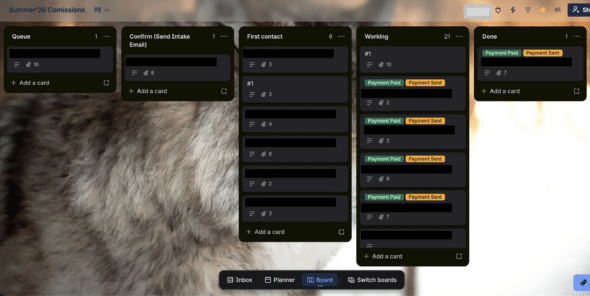
The board is the single source of truth — every Zap reads from and writes to it.
Small Zaps, One Source of Truth
The design principle is the thing I’d most want another developer to take from this. Instead of one big automation that tries to handle a commission end-to-end, I built a handful of small, single-purpose Zaps, each owning exactly one transition in the state machine. The Trello board is the shared state they all read from and write to. That’s the whole architecture, and it’s far easier to reason about than a monolith — each Zap is short enough to hold in your head, and changing one stage never risks breaking another.
Intake is the front door. That Zap is just: Google Forms New Response → Trello Find Card → a Formatter Get commissioner count step (Perform Math Operation) for some bookkeeping → a Formatter Text step (Extract Email Address) to pull a clean address out of the free-text field → Trello Create Card in the Queue. Five steps, one job: turn a form submission into a card.
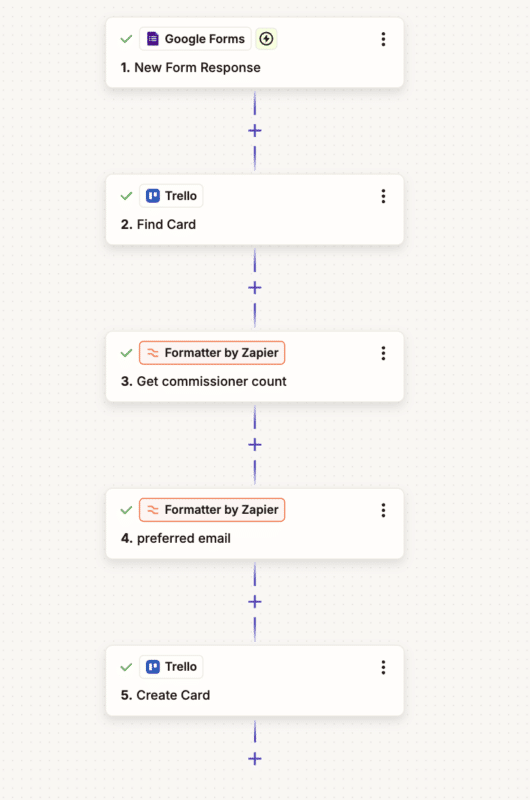 The full intake Zap — short enough to read top to bottom in one glance.
The key for creating these Trello cards is to put the client’s email in the title of the card. This way, if you have a future Zap that needs to use their email, such as sending them an automated email, you can easily grab it from the Trello card title.
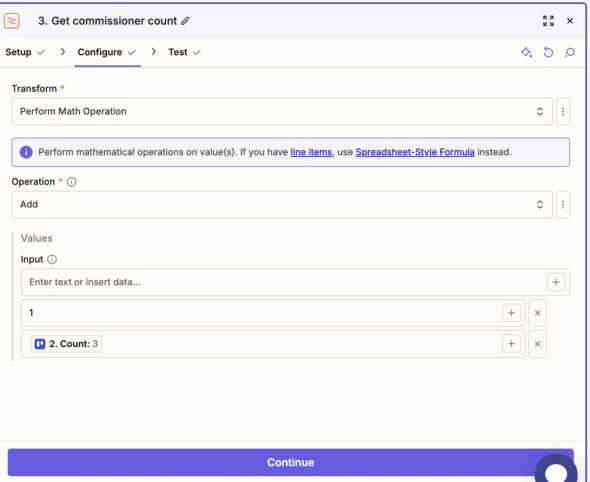
Because a client can place multiple commissions, I added the Find Card -> Get Commissioner Count Steps to put a number count of what number commission a Trello card refers to. For example email #1, email #2, etc.
The Interesting Parts
A few stages were more than glue, and those are the ones worth showing.
The intake email is a human-triggered webhook
After reviewing a commission submission, my partner would then send the client a confirmation email that he was going to go forward with their commission. This email was not customized, but he still went through the arduous process of emailing every person manually. Of course, we could speed this up.
I decided to make a column on the Trello board for Confirm (Send Intake Email) that would automatically send out this email to the client. The email was sent out after 5 minutes of being in the column (in case it was moved by accident), and a check was made to ensure the commission hadn’t already triggered an email being sent. It also attached a “Summer’26 Commission” tag to the email so it was easier for him to sort through these emails.
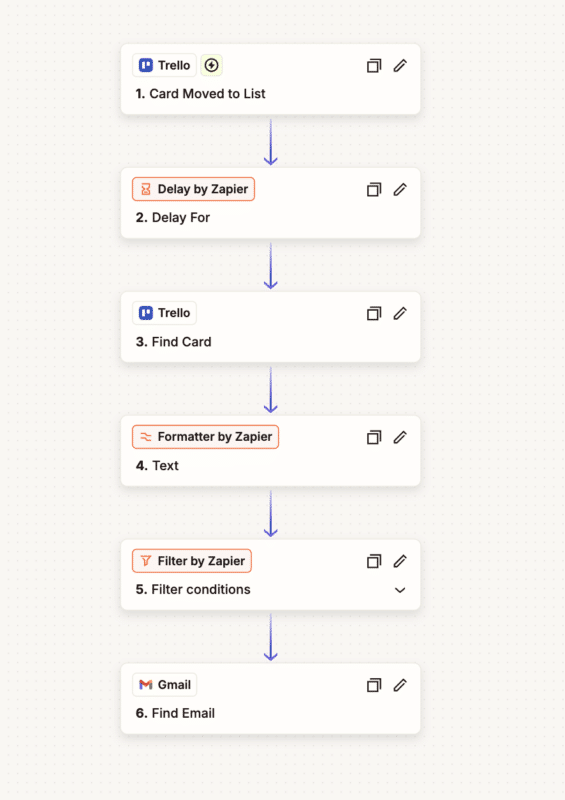
The Filter conditions step checked if an email actually existed after the Formatter step in order to protect against bad data. Find Email has two steps – it checks that the email already exists with a paticular search string (in my case it was to:{email} subject:subject:Jay Summer'26 Commission Confirmation. This way, duplicate emails wouldn’t be sent. If the email wasn’t found, a new one was sent.
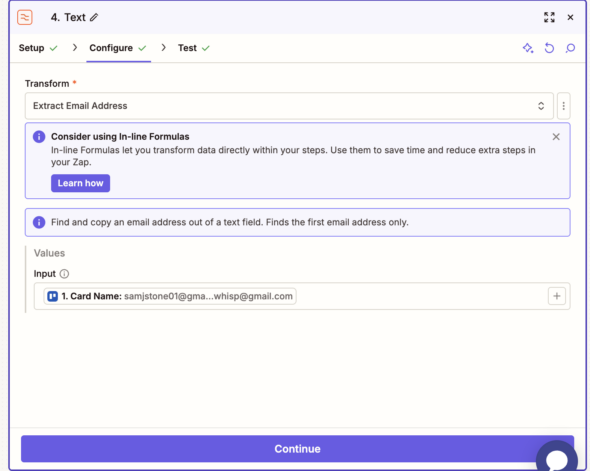
The Text Formatter step is used a lot in my Zaps, it extracts a valid email from the title of the Trello card. This is important because I’m appending a number onto the title of the Trello card too.
Stripe drives the payment labels
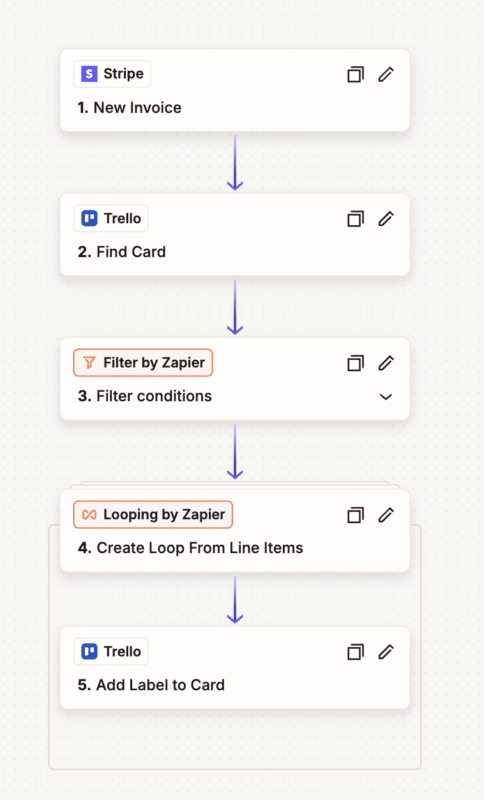
Payments run on Stripe, and two Zaps keep the board honest about money. A New Invoice trigger finds the matching Trello card and applies a Payment Sent label; a New Payment trigger relabels it Payment Paid. Both are Stripe webhooks, so the board updates in near real time without anyone touching it. The exact thing that used to fall through the cracks — “did we ever charge this person?” — is now a color on a card.
The daily nudge, and a detour through Discord’s character limit
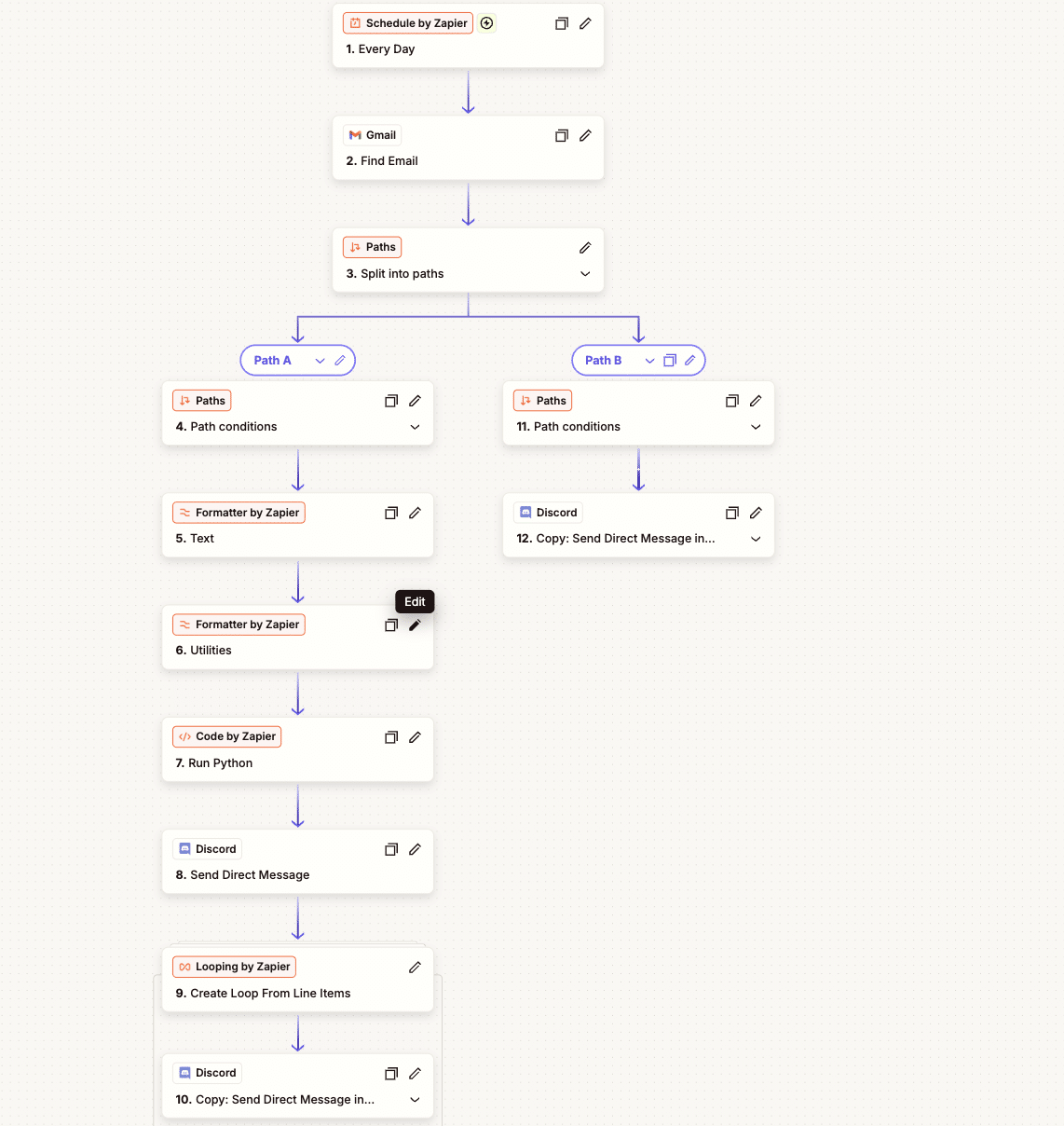
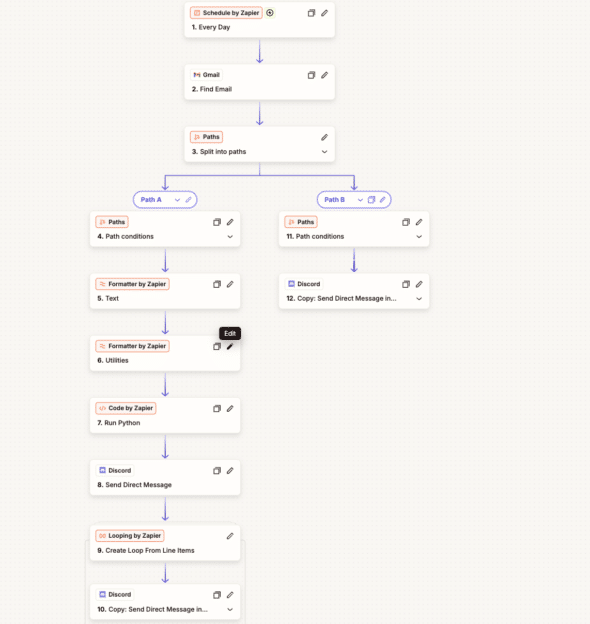
My partner often struggled to remember if there were emails he needed to reply to. I helped solve this problem by creating a scheduled Discord bot. The bot DM’d him every morning with the emails that hadn’t been replied to yet.
A Schedule trigger runs once a day, and a Gmail Find Email search pulls commission emails that haven’t received a reply yet. To search for relevant emails I used this search string “Summer’26” -from:me”. I initially tried searching by email labels, but the search randomly stopped working. Then I had to go off my email subjects (which is unfortunately not a foolproof solution).
Then it branches on the result count:
- Inbox clear: send my partner a single cheerful “you’ve replied to everything!” Discord DM.
- Unanswered emails exist: build a digest and DM it.
Building the digest is where it got fiddly. I run each email’s body through a Formatter Truncate (50 chars, ellipsis appended) and a Line-item to Text step to format them into [sender](link): preview lines joined by blank lines. The problem: Discord caps a message at 2,000 characters, and a busy morning can blow past that easily. Zapier’s built-in steps don’t chunk text on a character boundary, so I dropped into a Python Code step:
import json

raw = input_data['emails']
parsed = json.loads(raw)
text = parsed['output']['text']

emails = text.split('\n\n')
chunks = []
current = ''

for email in emails:
    if len(current) + len(email) + 1 > 2000:
        chunks.append(current)
        current = email
    else:
        current += ('\n' if current else '') + email

if current:
    chunks.append(current)

return {'messages': chunks}
It greedily packs whole emails into sub-2,000-character chunks and never splits an email mid-line. The Zap then sends a header DM and runs a Looping step over messages, firing one Discord DM per chunk. It’s a small thing, but it’s the seam where no-code hit a hard wall. A few lines of Python carried it the rest of the way.
What I’d Take Away
Give each Zap one job. A commission touches Google Forms, Trello, Gmail, Stripe, and Discord, but no single Zap touches all of them. Each owns one transition, the board holds the shared state, and the system stays legible because of it. Small and composable beats clever and monolithic.
Let humans trigger the irreversible stuff. The intake email fires on a deliberate Trello move, not on form submission. Automating the busywork while keeping a person on the decisions is a much better place to live than full auto-pilot when there’s real money and real clients involved.
No-code gets you far; code covers the last mile. Most of this is Formatter steps, Paths, and app actions. But when I hit Discord’s character limit, a Code step was right there. That escape hatch is what makes Zapier viable for workflows that aren’t quite trivial.
The sticky notes are gone. It still takes a lot of work to make 90 commissions. Automation can’t paint for you, but nothing is forgotten, nobody gets accidentally un-charged, and every morning my partner gets a Discord ping telling him exactly where things stand. For a wall of paper’s worth of anxiety, that was a very good trade.