

At Atomic Object we have a pair lunch policy that allows Atoms to take each other out to lunch on the company’s dime.
Free lunch is a no-brainer, right? Well, yes, but every time I decide I’m in the mood for a pair lunch, I need to make a few decisions: Who do I ask? Who’s free? Who haven’t I lunched with recently? This pair lunch activation cost is something I’ve heard Atoms commiserate about before, so I figured I’d build a small tool to help. I’ll call the tool Pluncher.
My first move was a fresh Convex project. I had the schema half-sketched and was trying to figure out deployments when a coworker asked, “Why isn’t this a Slack bot?” I closed the Convex tab.
The web-app stack ritual is muscle memory: pick the framework, stand up a database, wire up auth, pick a host. None of it is wrong. It’s just oversized when the initial audience is one office and the feature is “find a free hour next week.”
The Web App Default and Why It’s Risky
Consider some of the hidden costs of building an internal web app with an oversized architecture:
- Activation cost. If you want coworkers to use your tool, you need them to remember that it exists, that it’s accessible, and that it’s easy to use.
- URLs. You need a place to host the thing, and you need your coworkers to remember where it lives. The Slack-channel announcement loses a war of attrition with everyday chatter, and a month later, nobody remembers the link.
- Design system. You’re either building components from scratch or fighting Tailwind config files at midnight. Either way, unless your visual design instincts are far better than mine, it won’t look as nice as the tools your coworkers already use, which makes them less likely to come back.
- Mobile. Half the people on your team will try it from a phone, and responsive design is its own time tax.
- User identity. Nobody wants another password. SSO is the right answer, and while you might lean on Claude to write the plumbing, you’ll still be chasing a long tail of redirect-URI and consent-screen surprises.
Each cost is small. Combined, they kill internal tools before anyone gets to the feature you actually wanted to build.
What Slack Gives You Free
You can trade every cost from the last section for one decision: build inside the chat tool your coworkers already have open. Slack hands you four things you’d otherwise wire up yourself: identity, distribution, a design system, and a conversational surface. They might not be best-in-class, but they’re already deployed and your coworkers already use them.
Identity is free. Every event your bot receives comes pre-authenticated. The slash command payload has a user_id, a team_id, and a trigger_id you can respond to.
Distribution is free. Your coworkers already have Slack open. They are not navigating to a tab, they are typing /plunch from the thread they were already in. The activation cost nearly disappears.
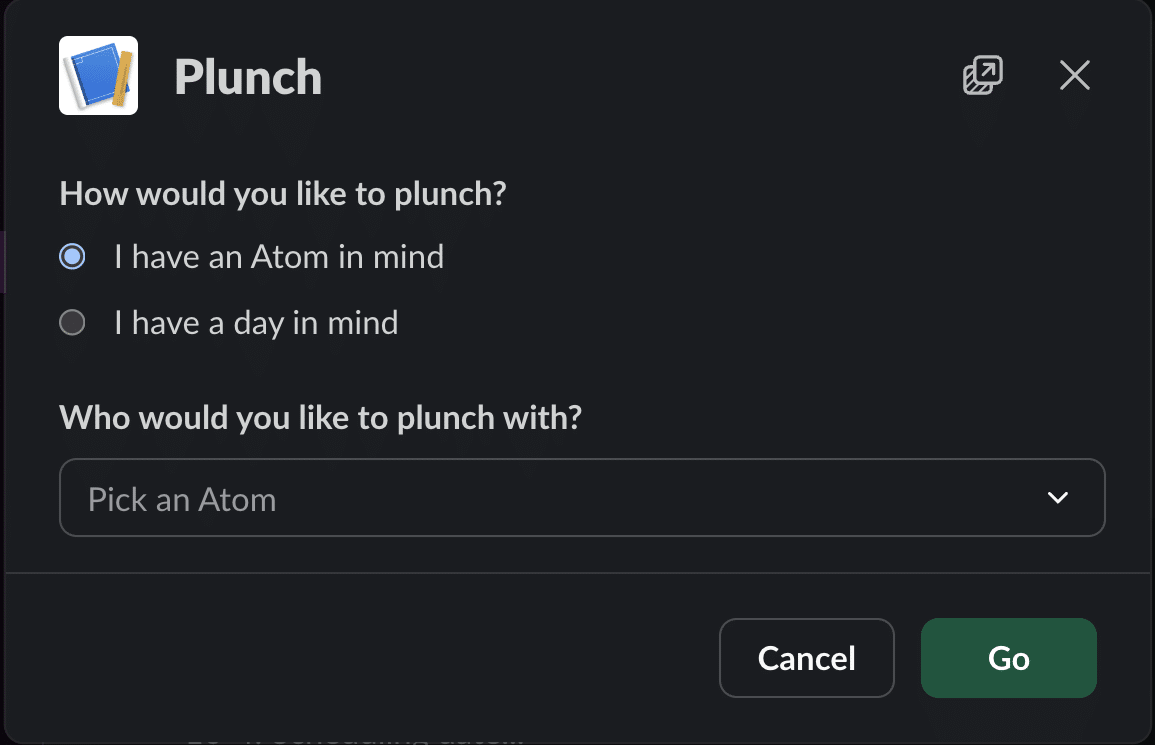
The design system is free. Slack ships Block Kit: a constrained set of components (sections, inputs, modals, buttons) you compose into JSON. Below is a screenshot of an early version of the Pluncher modal; it’s a few dozen lines of Python and renders consistently on desktop and mobile Slack clients. Note the ‘constrained’ part; you have limited control over the final appearance. For coworker-scale tools, though, that’s a feature, not a bug.
The conversation is your surface. Slack Apps, Shortcuts, and slash commands live next to the messages your coworkers are already sending.
What Slack Can’t Give You
Slack hands you a lot, but it doesn’t build you the tool itself. The interesting work is still yours to do, and you may encounter a few surprises along the way.
OAuth
You’ll avoid using OAuth for identity, but you may still need it for resource authorization. Pluncher, for example, needs to talk to the Google Calendar API on each user’s behalf, which means a per-user OAuth flow that Slack doesn’t handle. You build the flow, persist tokens, and refresh them. And, if your bot runs in Socket Mode (Bolt’s WebSocket-based path, which is easy to spin up for local development), there’s no HTTP server for the OAuth callback to live in, so you stand one up alongside the bot. The chat app starts to look uncomfortably like the web app you were trying to avoid.
State
Slack is stateless from your bot’s view: every event arrives clean. The moment you want to remember anything across events, like a stored token or a user preference, you’re picking a database and writing a schema. And once you have a database, you have backups, migrations, and the rest of the operational overhead.
A way around Block Kit constraints
Block Kit constraints are a feature when your problem fits: pick a person, pick a date, get an answer. Those same constraints can become an obstacle, though, once your tool’s UX demands outpace what Block Kit natively provides. If that happens, you’ll bridge to a web view eventually, and the question becomes whether the Slack scaffolding is still worth it.
Conclusion
By building on Slack instead of a web app, you dodge identity, distribution, and design system, and shuffle them to Slack. Not everything is free: you’ll still manage resource OAuth, state, and Block Kit constraints, but you’d manage those anyway. For a coworker-scale tool that wants to live where the conversation already is, it’s a deal worth taking.
I’m still building. (The technical post showing Pluncher in action is for another day.) For now, if you’ve got an internal-tool idea sitting in a notes file labeled “small web app,” don’t ask, “Should I build it?”. Ask, “Am I reaching for the right tool for the job?”