


Article summary
I recently found myself wanting to automate a tedious task in a UI application. Working on a Mac, I started out looking at AppleScript and HammerSpoon, but eventually settled on writing a small Swift app. Here’s what I learned!
What
The task I was looking to automate is really simple – click a few buttons, type a few characters, and capture some output text. For our purposes today we’ll use a silly stand-in: programmatically operating MacOS’ Calculator:
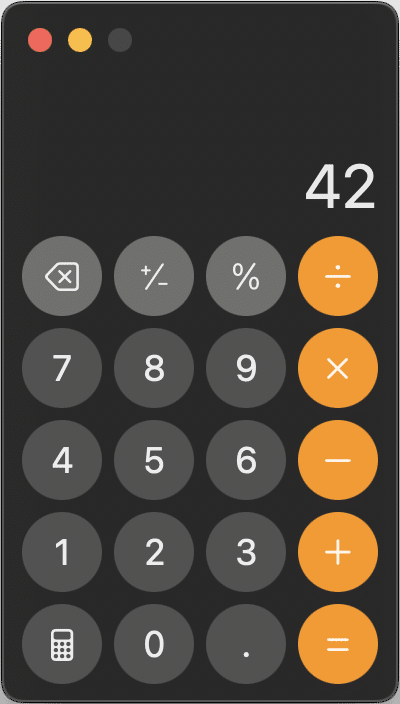
There are about a million ways to do math from the command line more efficiently than this, but can you think of any more absurd? 😆
Tech/Components
Three main pieces came together to make this possible:
Swift CLI
Aka SwiftPM, this manages a Swift project, with no Xcode necessary! (though Xcode will happily open the Package.swift project). I mostly used three commands:
swift package init --type executable # scaffold a new CLI project
swift run # build and run
swift build # just compile
AXSwift
This library provides a friendlier wrapper over MacOS’ accessibility APIs, for e.g. clicking buttons and reading text.
MacOS’ Core Graphics
Specifically, the CGEvent for sending keystrokes.
AI Assistance
Each of these components were new and unfamiliar to me, but Claude Code made quick work of them, allowing me to quickly discover and integrate the pieces, and teach me some Swift along the way. And then, importantly, the AI agent allowed me to iterate on the implementation in higher-level terms, e.g. “let’s add a command-line parameter for X” or “I see a similar patterns in foo() and bar(); can we extract a shared helper?”.
Voila
Here’s the result:
And here’s the (surprisingly short) code (github):
import AXSwift
import AppKit

let arguments = CommandLine.arguments

if arguments.count != 2 {
    print("Usage: silly-calc ")
    print("Example: silly-calc 123+456=")
    exit(1)
}

let expression = arguments[1]
print("Got expression: \(expression)")

let app = getCalculatorApp()

print(
    "\n🎯 Found Calculator! PID: \(app.processIdentifier)")

app.activate(options: .activateIgnoringOtherApps)

Thread.sleep(forTimeInterval: 0.5)

clickButton(app: app, text: "All Clear")
Thread.sleep(forTimeInterval: 2)

print("\n⌨️  Typing: \(expression)")

expression.forEach { char in
    typeCharacter(String(char))
    Thread.sleep(forTimeInterval: 0.05)
}

print("")
print("📄 Application Text:")
print("===================")

let texts = getAllText(from: app)

if texts.isEmpty {
    print("(No text found)")
} else {
    texts.forEach { print($0) }
}

// ==============================================================

func getCalculatorApp() -> NSRunningApplication {
    func findCalculator() -> NSRunningApplication? {
        NSWorkspace.shared.runningApplications
            .first { app in app.bundleIdentifier == "com.apple.calculator" }
    }

    // First, try to find Calculator if it's already running
    if let existingApp = findCalculator() {
        return existingApp
    }

    // If not running, launch Calculator using system command
    let task = Process()
    task.launchPath = "/usr/bin/open"
    task.arguments = ["-a", "Calculator"]
    task.launch()
    task.waitUntilExit()  // Wait for the launch command to complete

    // Wait for the app to start and become available
    for _ in 1...25 {
        Thread.sleep(forTimeInterval: 0.3)

        if let launchedApp = findCalculator() {
            return launchedApp
        }
    }

    fatalError("❌ Calculator launched but couldn't find the running process")
}

func clickButton(app: NSRunningApplication, text: String) {
    for element in getAllUiElements(from: app) {
        let role = (try? element.attribute(.role) as Any?) as? String ?? ""

        guard role == "AXButton" else { continue }

        let title = (try? element.attribute(.title) as Any?) as? String ?? ""
        let description = (try? element.attribute(.description) as Any?) as? String ?? ""

        if title.contains(text) || description.contains(text) {
            do {
                let actions = try element.actions()
                if actions.contains(.press) {
                    try element.performAction(.press)
                    print("\n🖱️  Clicked '\(text)' button")
                    return
                }
            } catch {
                continue
            }
        }
    }
}

func typeCharacter(_ char: String) {
    let unicodeChars = Array(char.utf16)
    guard let event = CGEvent(keyboardEventSource: nil, virtualKey: 0, keyDown: true) else {
        return
    }
    event.keyboardSetUnicodeString(stringLength: unicodeChars.count, unicodeString: unicodeChars)
    event.post(tap: .cghidEventTap)
}

func getAllText(from app: NSRunningApplication) -> [String] {
    return getAllUiElements(from: app)
        .compactMap { element in
            let role = (try? element.attribute(.role) as Any?) as? String ?? "Unknown"
            guard role.contains("Text") else { return nil }

            return (try? element.attribute(.value) as Any?).flatMap { value in
                switch value {
                case let str as String where !str.isEmpty: return str
                case let num as NSNumber: return num.stringValue
                default: return nil
                }
            }
        }
}

func getAllUiElements(from app: NSRunningApplication) -> [UIElement] {
    guard let axApp = Application(forProcessID: app.processIdentifier) else { return [] }
    let windowElements = getAsUIElements(from: try? axApp.attribute(.windows) as Any?)
    return windowElements.flatMap(collectAllChildren)
}

func collectAllChildren(from element: UIElement) -> [UIElement] {
    let children = getAsUIElements(from: try? element.attribute(.children) as Any?)
    return [element] + children.flatMap(collectAllChildren)
}

func getAsUIElements(from any: Any?) -> [UIElement] {
    (any as? [AnyObject])?.compactMap { UIElement($0 as! AXUIElement) } ?? []
}
Thoughts
I always love automating minor annoyances like this. Even if the time investment doesn’t quite pay off, there’s a squishier psychological benefit: I get to take a daily ritual of groaning about the chore and replace it with a smug grin.
And about that time investment. It feels like AI has significantly lowered the bar for side projects like this: before, it would have taken much longer to discover the pieces and how to use them, and I might not have bothered.
Are you living with any recurring annoyances that may be worth revisiting, now that squishing them has gotten cheaper?