

I frequently get questions from traditional graphic design students, inquiring about what designing software products is like. They want to know more about what I do and what they can do to get their foot in the door as a software maker. The answer to both of those questions can get complicated, but I think I’ve gotten fairly good at boiling it down.
What does a Software Designer do? What skills do they possess?
A software product designer uses human-centered design techniques to help create the foundation for software. This often includes conducting research, shaping the structure and workflows of an application, designing the interface, and continuously testing ideas with users.
At its core, software design is about making technology easier and more valuable for people to use. Professional designers do far more than “make software pretty.” They ensure that software works well for the people who rely on it.
Designers typically help guide teams in:
- Understanding the needs and behaviors of users
- Creating prototypes and testing them with users
- Deciding how the software should look and behave
Human-centered design ties all of this work together. It’s an approach that puts users at the center of the design process. Designers begin by learning about people’s needs through research, then design and test solutions with those needs in mind. Along the way, new insights often emerge, and teams adapt their plans accordingly.
Design is rarely a straight line. It’s an iterative process of learning, testing, and improving.
Research
Research is a part of any design process.
For software product design, you might be researching competitors, other applications to integrate with, or understanding emerging technologies. You most certainly will do user research. This can take many different forms, depending on your audience and goals. However, it often involves observing and listening to users of a certain application or product to get a better understanding of how you might make tasks easier for them to perform.
A great designer spends a lot of time listening.
User testing & feedback
User testing is a critical part of a software designer’s job. What good is software if no one wants to use it?
Ideally, user testing happens early and often throughout the design process. Observing real people interact with your product can reveal issues that designers and developers would never be able to assume on their own.
Testing might involve:
- Moderated usability sessions
- Remote testing tools
- Surveys and feedback forms
- Informal conversations with users
Great designers work hard to understand their users’ problems and perspectives. They listen carefully, ask thoughtful open-ended questions, and design solutions that fit real human behavior, not idealized behavior.
Information architecture
Information architecture is about structuring the experience of the application.
A strong information architecture helps users understand where they are in the product, what they can do next, and how to accomplish their goals quickly.
When this is done well, software feels intuitive and stays out of the way.
Wireframing
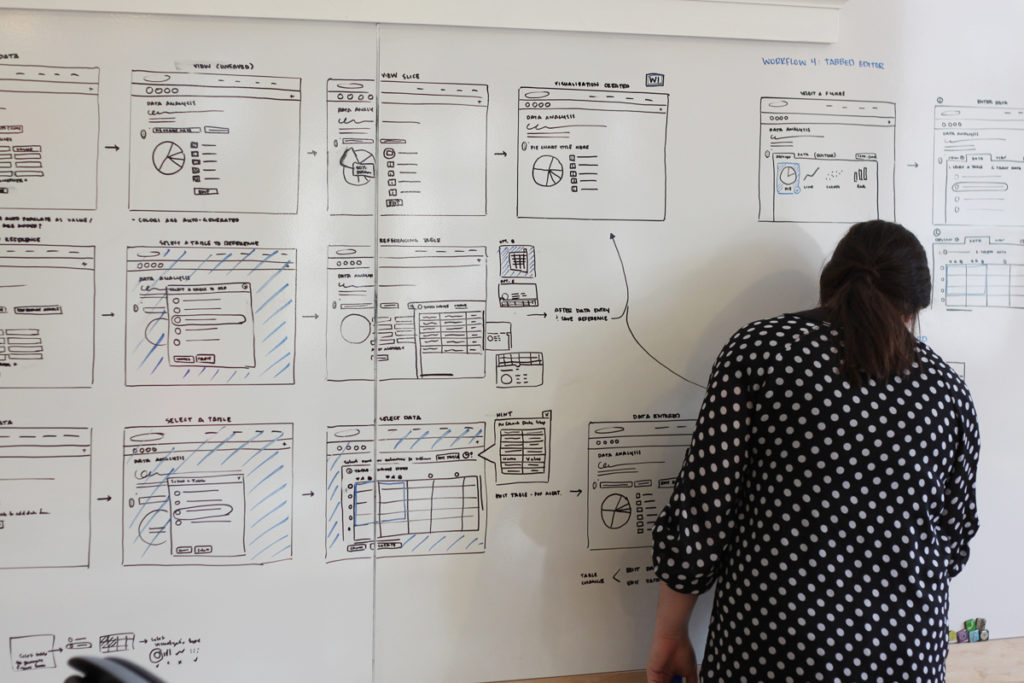
Wireframes are like the blueprints for an application.
They focus on structure rather than style. Wireframes typically avoid visual details like colors, polished typography, or imagery. Instead, they show where content lives and how users will move through the interface.
Wireframes help teams think through workflows before investing time in high-fidelity design or development.
Today, many designers create wireframes directly in collaborative tools like Figma, where they can quickly iterate with teammates and developers.
User interface (UI) design
This is the aspect of software design that most people recognize. What is the application going to look like? What’s the color palette, the typography, the visual style? Simply put, user interface designers create the interface where users interact with software. There are a variety of tools to do this, but Figma is currently the industry standard.
If you come from a more traditional design background, such as graphic design, many familiar learnings, like gestalt principles and color theory, still apply when designing UI.
Prototyping
Prototypes allow designers and teams to test ideas before building out the fully functioning software. This can save a lot of time and money.
Prototypes might range from low-fidelity click-through flows to realistic, interactive prototypes that closely resemble the final product’s visual look and feel.
There are many tools out there to prototype quickly—from design tools like Figma, to lightweight coded prototypes, to AI-assisted workflows that generate interface ideas rapidly. In recent years, AI tools have really started playing a role in the prototyping process. Designers can now use AI to:
- Rapidly generate interface concepts
- Turn rough sketches or wireframes into higher-fidelity layouts
- Produce placeholder content or microcopy
- Explore multiple design directions quickly
AI doesn’t replace design thinking. Instead, it helps teams explore more ideas faster, allowing designers to spend more time evaluating solutions with users rather than manually producing every variation.
Generalists vs. specialists
At Atomic, our designers all hold the title of “Software Consultant & Designer.” This is because we are generalists who all do all of the jobs mentioned above. However, there are companies where designers might specialize in one of these areas. For example, if you’re very interested in research, you could choose to specialize in just that.
Technical Fluency
More and more designers today are becoming comfortable working closer to the implementation side of software.
You don’t necessarily need to be a full-time developer, but understanding how software is built can dramatically improve your effectiveness as a designer.
Technical familiarity helps designers communicate more effectively with engineers, as well as design solutions that are realistic to implement (e.g. less back-and-forth with the technical team due to technical constraints).
Learning the basics of frontend technologies like HTML, CSS, and JavaScript can be a great starting point. However, with the emergence of AI, designers can also experiment with AI-assisted prototyping and coding environments.
The goal isn’t to become a developer. It’s to better understand the medium you’re designing for.
How Can You Become a Software Designer?
It’s okay if you don’t have an extensive background or education in software. Many college and university programs still focus on a more “traditional” design approach. Don’t fret! That foundation is a great start for a career in software product design. You’ll do well in designing interfaces that are thoughtfully structured and visually engaging. But what about everything else? Here are some tips to get you up to speed.
Accept the fact that not everything you do will be shiny.
This is the first—and perhaps most important—mindset shift. Not everything you work on as a software designer will be visually stunning or flashy. Some projects might be, but much of the software in the world serves a very practical, utilitarian purpose.
You certainly won’t be working with French Paper and slinging high-quality inks. You might not be creating intricate illustrations or show-stopping typography treatments.
Instead, you’ll be designing tools that people use to accomplish real tasks. Your work will shape how someone completes a job, navigates a workflow, or solves a problem. Designing for interaction and usability has different implications than designing something meant purely to be observed or interpreted.
This can be a hurdle for designers with a fine art background. If you love spending days on a photography set or crafting the perfect artist statement, the transition to product design might feel unfamiliar. And that’s okay. Software design isn’t the right path for everyone.
Software design may not always produce gallery-worthy visuals, but it offers a different kind of fulfillment: you’re solving problems for people. And sometimes those solutions can meaningfully improve how someone works or lives.
Follow the right people.
Surround yourself with people who can teach you. Follow people, blogs, podcasts, and companies who do the kind of work you aspire to do. You’ll be surprised at how much you can learn from an internet thread or a well-written article. Not sure where to start? Here’s a list of accounts to get the ball rolling:
- Atomic Object
- IDEO
- Luma Institute
- Nielsen Norman Group
- UX Collective
- Lenny’s Newsletter
- Hey Designer
- Sidebar.io
- Figma
- v0
Read the right books.
If you want to get up to speed on human-centered design, here are a few essential books that will familiarize you with the history, jargon, and techniques used in various aspects of software design. You’ll learn a great deal from them, and you’ll be able to discuss the concepts with other designers.
- About Face: The Essentials of Interaction Design
- Don’t Make Me Think, Revisited: A Common Sense Approach to Web Usability
- The Design of Everyday Things
- 100 Things Every Designer Needs to Know About People
- Interviewing Users: How to Uncover Compelling Insights
- Solving Product Design Exercises: Questions & Answers
Attend software design events.
The software design community is quite large, and you should become a part of it. You’ll meet interesting people and learn more about the field. Depending on where you are located, the events might vary.
Don’t be afraid to attend events that are not geared specifically toward design, either! You can still learn a lot from a software development or product meetup, especially if the event you attend is a little less technical. Keep an eye out for these groups:
- IxDA
- Ladies that UX
- AIGA
- CreativeMornings
- Women In Product
- ProductTank
- Product Development Management Association (PDMA)
- Explore Meetup, LinkedIn Events, and Luma in your area for more local events
Build a solid portfolio.
If your goal is to get a job as a software designer, then of course, you need to have a solid portfolio. I’ve written about how to curate a job-winning portfolio in the past. Those tips are all relevant here, so give it a read!
If you’re finding that you do not have enough applicable projects to include when applying for a software design position, make your own projects. I know it can be daunting to figure out what those projects should be. Here are a few ideas to get you started:
- Join the Daily UI challenge.
- Redesign a workflow of an existing app that currently frustrates you.
- Create a new feature for an existing app that you always wished existed.
- Interview your friends and family to find a common problem they have. Solve it with software.
Talk to software product designers.
Don’t be afraid to reach out to other designers. When you attend those design events, don’t leave right after the presentation. Hang around and get to know the people in your community.
Ask a designer at a local software company out to coffee. Most people are more than happy to chat with a student or someone interested in what they do, especially if coffee is involved. Use this as an opportunity to learn more about what their day-to-day flow is like and to glean any tips for refining your portfolio. You never know where those connections could lead.
Keep It Up
The process of entering a new field can sound scary and daunting, but it is certainly doable. Keep soaking up all that you can learn, and interject yourself into as many community events as you can. Before you know it, you’ll be giving students advice on how to become a software designer.